There’s a scene everyone remembers from The Matrix.
Neo looks at the world and, for a second, stops seeing people and walls and rain. He sees the code underneath. The system that’s actually running.
That’s debug.
A superpower nobody talks about
Most people think of debug as a chore. Something you reach for when a bug shows up, use for ten minutes, then forget about.
I’ve always loved it.
Give me a game covered in colored lines, circles, boxes, arrows, capsules, paths, labels and numbers and I’m happy. To someone looking over my shoulder, I’ve just made the game completely unreadable. To me, I’ve made it clearer.
That enemy isn’t just standing in the wrong place anymore: I can see where it wants to go, what it’s looking at, what state it’s in and what it thinks its target is. That explosion didn’t mysteriously hit the player; I can see the radius. That interaction isn’t randomly failing; I can see the trigger volume and notice that the player is just outside of it. If a projectile behaves strangely, I can see its trajectory and the collision that changed it.
You’re not guessing anymore. You’re seeing.
That’s incredibly powerful when debugging because a bug report usually tells you what someone experienced, not what actually went wrong.
“The player can’t use the zipline.”
That could mean a lot of things. Maybe the interaction isn’t active, the player isn’t detected near it, the input never registered, the interaction started but movement is blocked, or the destination itself isn’t valid. Without visibility into the system, all of those are possibilities you need to investigate.
With the right debug information, you can start eliminating them immediately. The interaction is active. The player is at the right distnace. The input registered. The destination is red.
There you go.
Sometimes you can understand a problem before you’ve even opened the code, and once you’ve had that kind of visibility, going back to reading logs and hoping feels a little like giving the power back.
Debug as a development tool, not just a bug tool
The part I think gets underestimated is how useful all of this is when nothing is broken.
Say you’re setting up a new gameplay feature. Before you trust it, you want to understand what it’s actually doing. Which areas can the player reach? What’s currently active and what’s dormant, waiting for a trigger? Does that explosion radius really cover the area you think it does? Where does the projectile actually go? Is that interaction distance really two meters, or does it just sound right when you read the number in a data file?
None of this requires a debugger in the traditional sense. Sometimes all you need is a line, a circle, a capsule moving through the level or a value floating above something.
Once that information exists in the world, you don’t have to build a mental picture of the system from numbers and code anymore. The game is showing you what it’s actually doing, and the game tends to be much less interested in your assumptions than you are.
Here’s an example from Assassin’s Creed Origins. I worked on a system called stations, which defined locations where NPCs could perform activities. A station could have multiple entry points, but those entry points weren’t necessarily usable: their validity depended on the navmesh, the environment around them or what a designer selected.
Instead of trying to infer that validity from data, I could simply draw it.
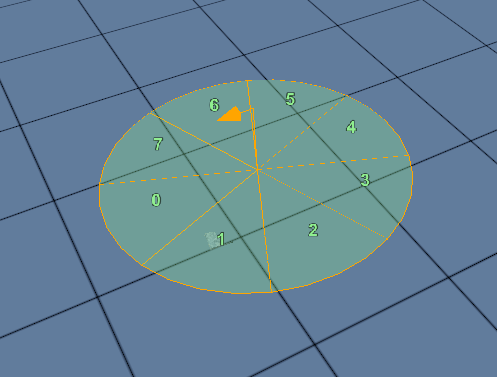
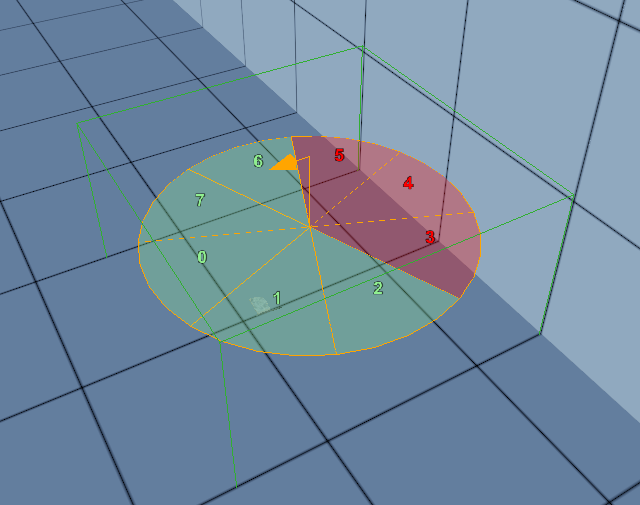
At a glance, you know which entry points work and which don’t. The internal state of the system has become something you can see directly in the level.
You don’t need the real assets
This is also where debug draw becomes much more than a debugging tool. It becomes a prototyping tool.
One of the realities of gameplay programming is that the thing you’re implementing often depends on work that doesn’t exist yet. Maybe the animation isn’t ready, the VFX are still being worked on, the final mesh hasn’t been made or the UI hasn’t been designed. None of that should necessarily stop you from answering gameplay questions.
An explosion radius doesn’t need a particle effect to be testable; a debug sphere is enough to start figuring out whether its size makes sense. A zipline doesn’t need its final mesh when a debug line can already tell you if the traversal works. A projectile doesn’t need beautiful VFX when a small sphere moving through the world can tell you whether its speed and trajectory feel right.
And a health bar certainly doesn’t need final UI.
For years I’ve occasionally used something as stupidly simple as a row of letters to represent one. Give me a bunch of I, change their color and opacity according to the health value, and I already have enough information to work with.
Believe it or not, that’s exactly what you’re seeing here.
It’s ugly, and that’s perfectly fine. Its job isn’t to ship; its job is to let us work.
There’s another advantage to this kind of visualization: debug doesn’t lie very well. A beautiful explosion has sound, particles, camera shake and animation helping to sell it, while a debug sphere has nowhere to hide. Strip the presentation away and you’re looking directly at the mechanic underneath.
That doesn’t mean the feature is finished when the real assets arrive. Animation, audio, VFX and final geometry can completely change how something feels, and they’ll often reveal problems of their own. But you don’t have to wait for all of that to answer the fundamental questions: does this work, is the scale right, is it fun, and are we even building the right thing?
Finding that out early is considerably cheaper than finding it out months later.
A shared language
There’s something else I like about debug tools: despite being mostly built by programmers, they don’t have to be tools for programmers.
A designer doesn’t need to understand how an interaction system is implemented if they can turn on its debug view and immediately see its active volumes. QA can sometimes explain a bug with a screenshot instead of three paragraphs. An animator can see where gameplay thinks a character or target actually is, while VFX can see the real radius they’re trying to visually represent. Even another programmer can understand what your system is doing without first spending half an hour reading your code.
A good debug view turns internal information into something everyone can point at and say, “That. That’s wrong.”
The station debug from Assassin’s Creed Origins was useful in exactly that way. The validity of each entry point was evaluated live according to the navmesh and nearby obstacles, so as a Level Designer moved or modified a station, the debug representation updated with it.
They didn’t need to ask a programmer whether a setup was valid, nor did they need to understand the code deciding it. The system told them directly.
That’s when debug becomes more than something you built to help yourself. It becomes a language between disciplines.
Seeing behind the curtain
Players will only ever see the final version of a game: polished, animated, dressed up and hiding every seam it possibly can. That’s how it should be.
But I really enjoy the version underneath.
The ugly version covered in collision boxes and trigger volumes, with trajectories flying everywhere, names floating above characters and circles showing things nobody playing the game should ever know exist. There’s something strangely satisfying about looking at what appears to be complete visual chaos and understanding exactly what you’re seeing.
A bit like seeing the Matrix.
Maybe that’s why I’ve always enjoyed building debug tools as much as I do. They’re obviously useful when something breaks, but that’s almost the least interesting part.
They let you test things that don’t exist yet, communicate systems to people who didn’t build them and question assumptions before those assumptions turn into bugs. Most importantly, they let you see the game for what it actually is rather than what you think it is.
Once you’ve seen a game that way, it’s very hard to go back to building blind.